
Models
There are a few different models that can be used to measure digital carbon emissions. CO2.js includes two of these - the OneByte model, and the Sustainable Web Design Model. This guide will show you how use the different carbon estimation models available in CO2.js.
Default estimation model
CO2.js uses the Sustainable Web Design (SWDM) Model version 4 as the default when calculating carbon emissions.
Carbon estimation models
The Sustainable Web Design Model
After importing CO2.js into your project, you can start using this model right away by initiating a co2() object. Alternately, you can pass in the model: "swd" option. This will use version 4 of the Sustainable Web Design Model by default.
import { co2 } from "@tgwf/co2";

const swd = new co2();
// You can also explicitly declare the model
const declaredSwd = new co2({ model: "swd" });
Using Sustainable Web Design Model version 3
By default, CO2.js will use the Sustainable Web Design Model version 4 calculations. To use Sustainable Web Design Model version 3, you can explicitly set it as the model version when initiating the a new instance of the co2() object.
import { co2 } from "@tgwf/co2";

const swdmV3 = new co2({ model: "swd", version: 3 });
Explainer: How the SWDM works
This model uses data transfer as an proxy indicator for total resource usage, and uses this number to extrapolate energy usage numbers for your application as a fraction of the energy used by the total system comprised of:
- the use-phase energy of datacentres serving content
- the use-phase energy network transfering the data
- the use-phase energy of user device an user is accessing content on
- the total embodied energy used to create all of the above
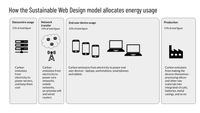
It then converts these energy figures to carbon emissions, based on the carbon intensity of electricity from the Ember annual global electricity review.
The carbon intensity of electricity figures for the swd model include the the full lifecycle emissions including upstream methane, supply-chain and manufacturing emissions, and include all gases, converted into CO2 equivalent over a 100 year timescale.
This follows the approach used by the IPCC 5th Assessment Report Annex 3 (2014), for the carbon intensity of electricity.
Ember's methodology notes detail where the rest of this data comes from in more detail, as well as any further assumptions made.
The OneByte model
Additionally, CO2.js also allows developers to use the OneByte model as introduced by The Shift Project in their report on CO2 emissions from digital infrastructure, Lean ICT: for a sober digital.If you want to use the OneByte model, then you'll need to let CO2.js know. This can be done by passing in a model parameter with a value of "1byte" when you initiate a new co2() object.
import { co2 } from "@tgwf/co2";

const oneByte = new co2({ model: "1byte" });
This returns a number for the estimated CO2 emissions for the corresponding number of bytes sent over the wire, and has been used for video streaming, file downloads and websites.
How the models differ
These models return slightly different results, since they apply different system boundaries as part of their calculations. Tom Greenwood has written a terrific blog post explaining system boundaries and how they impact carbon estimates.
The OneByte model, as it has been implemented in CO2.js, applies narrow system boundaries - datacenter and network only. It takes a top down approach to calculations, returning a single carbon emissions result based on a given input. It should be noted that the original model used in the Lean ICT report did have broader systems boundaries. However, when the model was included in CO2.js a judgement call was made to reduce its scope. You can read more about why in this GitHub issue.
On the other hand, the Sustainable Web Design Model has a broader system boundary (explained above). It takes a more complex, but detailed, bottom up approach. By using a wider system boundary, the Sustainable Web Design Model provides a more comprehensive carbon estimate. This also means that segmented estimates can be produced for each part of the system, allowing for greater granularity and flexibility.
Switching between models
To use the Sustainable Web Design Model in CO2.js, pass in the { model: 'swd' } or { model: '1byte' } parameter when initiating a new CO2.js object.
import { co2 } from "@tgwf/co2";

// Use the default Sustainable Web Design Model v4
const swd = new co2();

// Use the OneByte model
const oneByte = new co2({ model: "1byte" });

// Use the Sustainable Web Design Model v3
const swdmV3 = new co2({ model: "swd", version: 3 });-

- Home
-
-
CO2.js
- Overview
- Installation
- Roadmap
- Overview
- Overview
- perByte
- perByteTrace
- perVisit
- perVisitTrace
- Overview
- Electricity Maps
- Average intensity
- Marginal intensity
- Getting started: In the browser
- Getting started: NodeJS
- Getting started: Impact Framework
- Check a domain for green hosting
- Customise website carbon calculations
- Get segment-level results
-
-
-
Greencheck API
-